
กำลังโหลด...
 ABYS Academy
กำลังโหลด...

Frontend ยังเรียก GET /books และ GET /books/:id เหมือนเดิม
งานของเราคือเปลี่ยนภายใน route ให้ถาม PostgreSQL โดยผู้ใช้ API ไม่ต้องรู้
index.js เดิม ไม่ย้ายไฟล์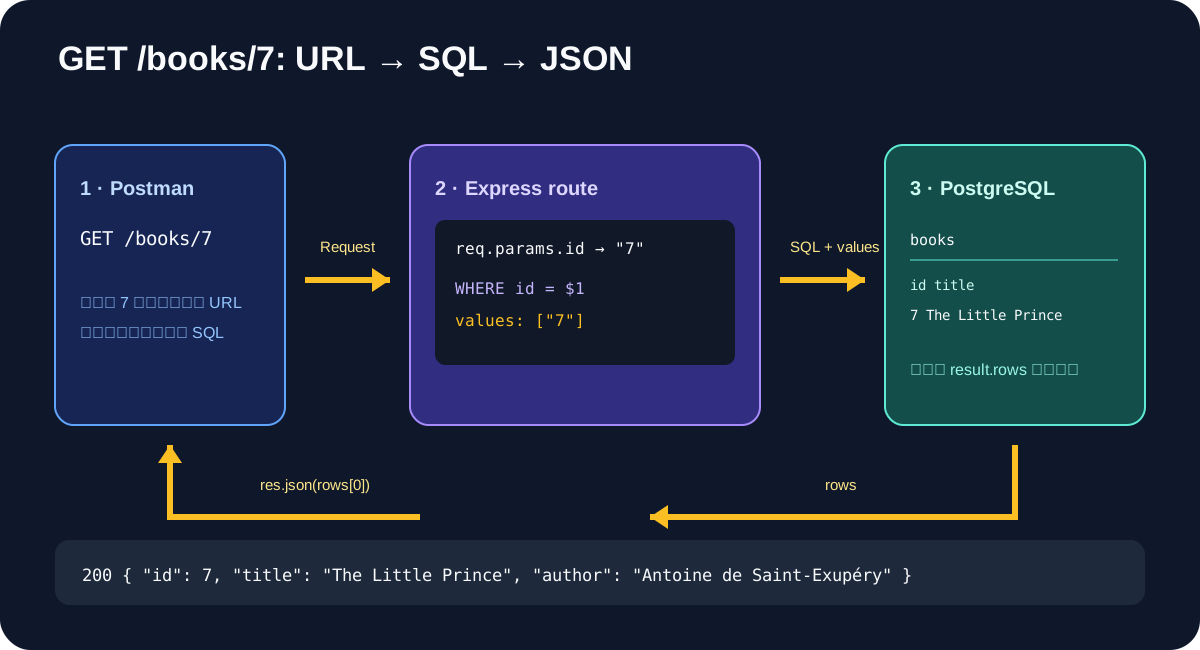
GET /books/7sequenceDiagram
participant C as Postman
participant R as Express route
participant D as PostgreSQL
C->>R: GET /books/7
R->>R: req.params.id = "7"
R->>D: SELECT ... WHERE id = $1, ["7"]
D-->>R: result.rows
alt เจอ
R-->>C: 200 + rows[0]
else ไม่เจอ
R-->>C: 404 + message
end
booksRouterโปรเจกต์ books-api ที่ทำมาแล้วมี route ทั้งหมดใน index.js และเราเพิ่งเรียน express.Router() แบบ demo มาเท่านั้น
เดิม: index.js → readBooks() → books.json
ใหม่: index.js → pool.query() → PostgreSQL
GET /books โดยคง pagination เดิมไว้ใน route app.get("/books", ...) เดิม ให้เปลี่ยนแค่บรรทัดนี้:
let results = readBooks();
เป็น:
const result = await pool.query(
  "SELECT id, title, author, year FROM books ORDER BY id"
);
let results = result.rows;
แล้วเปลี่ยน callback ของ route ให้เป็น async:
app.get("/books", async (req, res) => {
  // ... body เดิมของ route
});
ส่วน sort, page, limit และรูปแบบ response { page, limit, total, data } เดิมใช้ต่อได้ เพราะ result.rows ก็เป็น array เหมือน readBooks()
GET /books/:id ใน index.jsapp.get("/books/:id", async (req, res) => {
try {
const result = await pool.query(
"SELECT id, title, author, year FROM books WHERE id = $1",
[req.params.id]
);
if (result.rows.length === 0) {
return res.status(404).json({ message: "Book not found" });
}
res.json(result.rows[0]);
} catch (error) {
console.error(error);
res.status(500).json({ error: "Database query failed" });
}
});
ให้ แทนที่ route app.get("/books/:id", ...) เดิมทั้งก้อน ไม่ต้องวางซ้ำเพิ่มอีกก้อนหนึ่ง และวางหลัง /books/popular กับ /books/count เหมือนเดิม เพื่อไม่ให้ /:id จับคำว่า popular หรือ count
| จุด | ความหมาย |
|---|---|
/:id |
รับค่า id จาก URL |
req.params.id |
อ่านค่าจริง เช่น "7" |
$1 |
ช่องแทนค่าภายใน SQL |
[req.params.id] |
ค่าที่ใส่ใน $1 |
result.rows[0] |
หนังสือแถวแรกที่ค้นเจอ |
// ห้ามใช้: ค่าจาก URL กลายเป็นส่วนหนึ่งของคำสั่ง SQL
`SELECT * FROM books WHERE id = ${req.params.id}`

// ใช้: SQL และค่าจริงเดินทางแยกกัน
pool.query("SELECT * FROM books WHERE id = $1", [req.params.id])
{
  "id": 7,
  "title": "The Little Prince",
  "author": "Antoine de Saint-Exupéry"
}
ลองอีกครั้งด้วย /books/9999 ต้องได้:
{ "message": "Book not found" }
และ status ต้องเป็น 404
Cannot GET /books/... → ตรวจว่าแก้ใน index.js และ restart server แล้ว500 → ดู Terminal ของ Node ก่อน แล้วค่อยดู SQL404 ทั้งที่คิดว่ามีข้อมูล → รัน SELECT * FROM books; ใน pgAdmin เพื่อดู id จริง
ทำในไฟล์ index.js ของโปรเจกต์ books-api
เติม TODO สามตำแหน่งใน route เดิม GET /books/:id:
app.get("/books/:id", async (req, res) => {
  try {
    const result = await pool.query(
      "SELECT * FROM books WHERE id = $1",
      [req.params.TODO]
    );
    if (result.rows.length === 0) {
      return res.status(TODO).json({ message: "Book not found" });
    }
    res.json(result.rows[TODO]);
  } catch (error) {
    console.error(error);
    res.status(500).json({ error: "Database query failed" });
  }
});